Warning: Squarespace designer email scam

Scam Alert!
Scammers are targeting Squarespace website owners pretending to be Squarespace designers that they have worked with before. Find out how to stay safe.
Have you been contacted by your existing or past web designer out of the blue, regarding a site performance issue, audit, security, verification, license problem or platform update? It could be part of a sophisticated spoofing/phishing scam.
Learn out about a spate of scams impersonating actual web designers - using their names, logos and photos - and targeting website owners. Find out the details of exactly what this scam looks like, how to tell if an email or form submission is a scam, and what to do about it.
Jump to:
What is the Squarespace designer email scam? How are they doing it?
What does a Squarespace designer scam email look like? What do I look out for?
Your website contact forms might be targeted, too. How to check this.
What is this scam? What’s happening and how are they doing it?
Recently many of my clients and clients of other designers have been the target of a growing trend of email spoofing and phishing scams. The scammers are using sophisticated AI tools to extract email addresses and to bulk send contact forms on Squarespace websites, and also scraping web designer portfolios, forums and marketplace platforms. They are using these tools to find the connection between the target and the Squarespace web designer that they will impersonate to get the target to either send them money for fake services, or to gain access to the target’s website to perform nefarious actions.
It is not just Squarespace. I am aware of the same sorts of scams on Webflow, Wix, Wordpress, Shopify and ShowIt platforms. And I have verification from Squarespace that this is not due to a security breach, so personal details have not been leaked. The scammers are using AI and other automation tools to scour the web for their targets and extract details of designers, such as names, photos and logos.
The emails look incredibly legitimate; it’s hard to distinguish from the real thing.
Example of a Squarespace designer scam email
In addition to impersonating the web designer’s name, in some cases, the scammers have even included a photo and/or logo from the designer’s company in the email, and they often reference being a Verified Squarespace Partner (or similar). I’ve included one of the scam emails here as an example.
The email mentions having worked together before, and then gives some technical reason for them “reaching out” to help ensure compliance or to fix critical errors, or else the website will be restricted or suspended.
The scammer is relying on the pre-established relationship to bring the target’s guard down, and expecting the target to be a bit scared and perhaps baffled by technical jargon. They say that they will perform X service for free, or that they need access to the website in order to perform the service, but later they will say that they found more problems so they need money to fix these. Or, they ask upfront for money to perform an “urgent fix”. Some examples of the types of language they use include:
Compliance issues or accessibility compatibility checks
Platform or security updates or audits
License or domain verification
Extension or plugin updates or patches
This scam is particularly bad because it relies on people like me having a good relationship with my clients, who trust me to help them. The added photo and signature make it seem even more real.
It’s also affecting web contact forms, so check your form submissions carefully, too.
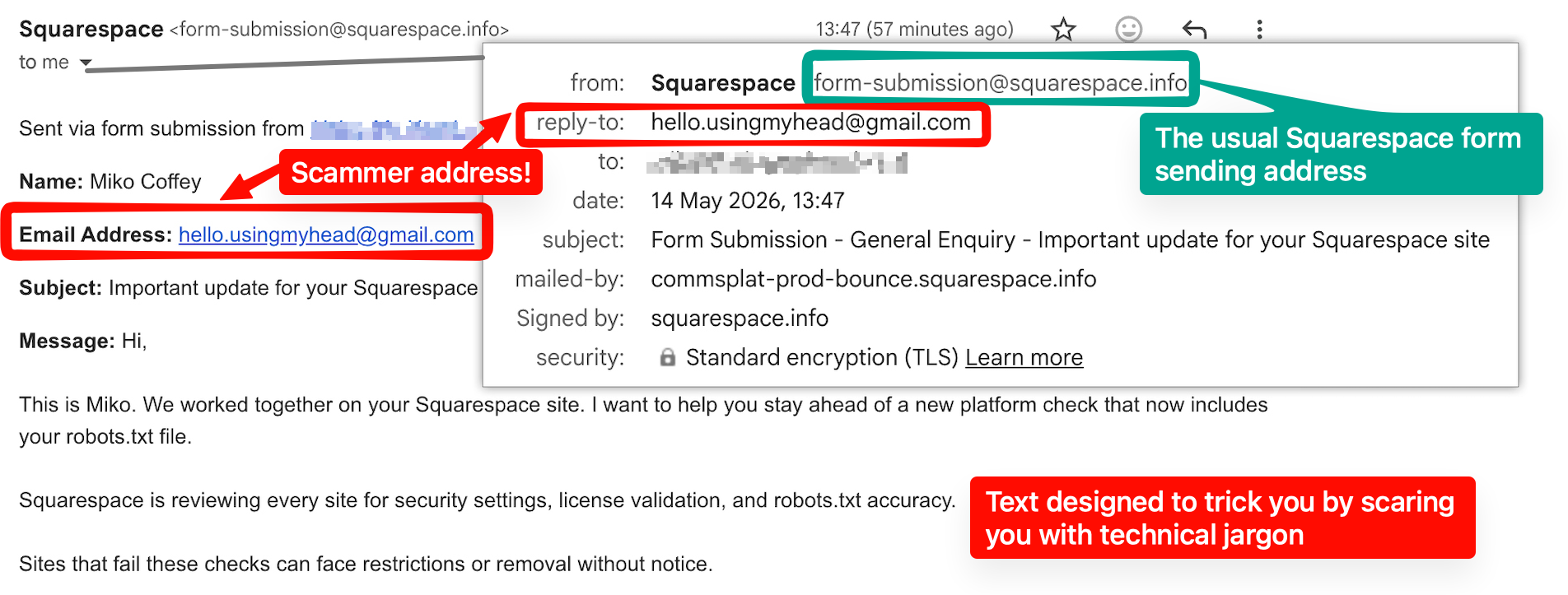
Some of the scammers are unable to find an email address on the target’s website, so instead they send these types of phishing requests by submitting contact or enquiry forms on the website. Therefore, the email you receive will appear to be the same as your usual contact form submissions: it will show “Squarespace” as the sender, and the subject line will be something like “Form Submission - xxxxxxx”. However, the email address that shows in the body of the email AND the reply-to address will be the scammer’s email address.
How to tell if it’s a scam
1. Always check the email address domain name! It’s the only foolproof verification.
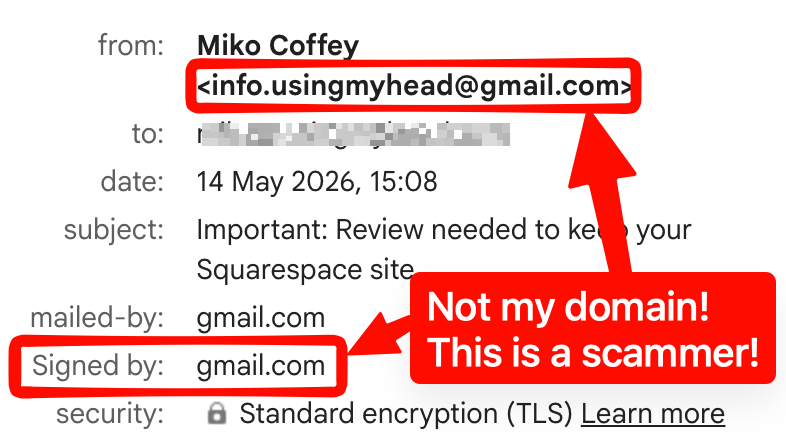
The sender name on an email can be faked*. You can put anything you want in that space, so it’s very easy to pretend to be “Miko Coffey”. It’s also easy to create legitimate-sounding email addresses that are not the real thing. For example, here are some of the scammer email address formats:
mikocoffey.usingmyhead@gmail.com
miko.usingmyhead@gmail.com
hello.usingmyhead@gmail.com
sales.usingmyhead@proton.me
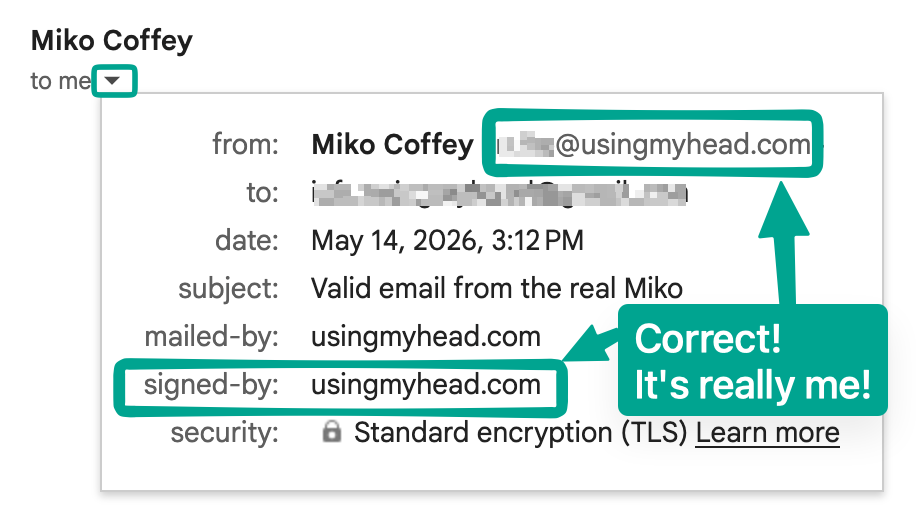
What cannot be faked is the email domain name - the part after the @ symbol. Ignore everything before the @ symbol; that can be anything. No unauthorised people will be able to actually send an email from @usingmyhead.com so that’s the important part to look at.
Although it is possible to fake the domain name in the email header as the sender, most email software has security measures in place to flag or reject any email that attempts this, so these would either go into your spam folder or show in your inbox with a warning. This means that you are normally OK just looking in the email header for the sender address ; however, to be 100% sure, you can use the instructions below for your email software to view the full email header details. Look at the Signed by domain name (or Mailed by, if there is no Signed by) and check that this matches the domain name of your web designer.
* Extra warning for Mac Mail users: turn off Smart Address now
The default setting on Mac Mail software hides the email address of the sender, only showing the “Name” field, which can be faked. You need to turn this setting off to be able to easily see the email address of the sender. This is recommended for anyone, even if you have not yet been targeted by a scam. Click Mail in the menu bar at the top of your screen, then select Settings (or Preferences on older macOS versions). Next, click on the Viewing tab and uncheck the box next to Use Smart Addresses. You might need to restart your app and then you should be able to click on the little arrow next to the name to see the email address.
-
You need to be in the web browser and not the mobile app.
Click the little down arrow / triangle next to the words “to me” as shown in the above green screenshot.
-
Click the three-dot icon (...) in the top-right corner of the message pane (not the top of the browser).
Select View.
Select Message details
-
In the menu bar, go to View > Message > All Headers.
To revert, select View > Message > Default Headers
Tip: If you're on a mobile or you couldn't see/understand the header using the instructions above, a "hack" is to check the Reply-To address by hitting reply on the email, BUT DO NOT SEND A REPLY. Just check what email address shows in the reply window. A scammer could never put the real designer's email address as the Reply-To address.
Watch out for misleading “typos”!
Look very closely at the email domain name, because there are also scams going around pretending to be Squarespace. Sometimes these scammers go the extra step to purchase domain names that look very similar to the actual domain. Here’s one such domain name from a scammer:
security@squarespacee.com - would you catch this one? Pretty sneaky!
I’ve even heard of another designer whose clients were getting scam emails from name@designercompany.co instead of their actual email, which is name@designercompany.com - stay vigilant to the finer details!
2. On a website form submission, the email address will not be the email sender. It’s the reply-to address and the email address in the form text.
First, I should say here that the most likely way to contact someone you’ve worked with before is through a direct email. I will never contact a past client using the contact form on their website, except in the very rare circumstance that my contact has left that company. So, you should already be a little suspicious about your web designer using this form of communication. However, it could happen, so be sure you look at the reply-to address and/or the address in the actual email text that is sent to you from your Squarespace website form. The sender will say “Squarespace” just like usual, like all your legitimate contact form submissions. Here’s an example of a scam form submission email:
3. They ask for you to give them access to your website, or something else that's unlikely to come from your real web designer.
Many of these emails say something like: “If you’d like me to carry out this free audit for you, just reply YES to this email.” Most legitimate business people would never ask something in this manner.
Other emails say something like: “In order to perform the license upgrade, I will need you to give me access permissions to your website.” Most web designers will already have access to their client’s website. Never invite anyone to have administrator access to your website without verifying that they are who they say they are. Other scammers are asking their target to share their personal Squarespace username/password in order to gain access to the website. A real web designer will never ask you for your personal Squarespace login details. Check out my tips below on how to keep your Squarespace account safe.
Another thing to check is the tone of voice. Does the email sound overly formal or overly familiar? Does it seem like it’s filled with technical jargon or terminology that you haven’t used before with your designer? Is there a deadline or sense of urgency? Is there a threat: for example, if you don’t do X, your website could be blocked or experience downtime or performance problems?
Tip: To check who has administrator access to your website:
- From the main admin menu on your website, look for the little cog icon at the bottom of the left skinny tool panel to open Settings.
- Go to Permissions and Ownership.
- Under Permissions, you will see a list of all the people who have access to edit your website.
- You can click on the name of any person in that list to see their email address.
- This means you can verify that the email address showing is the actual email address of your real designer.
If you need to remove a person's access, use the 3 dots at the top and click Remove Permissions.
4. If they are asking for payment, does the method of payment match how you’ve paid in the past?
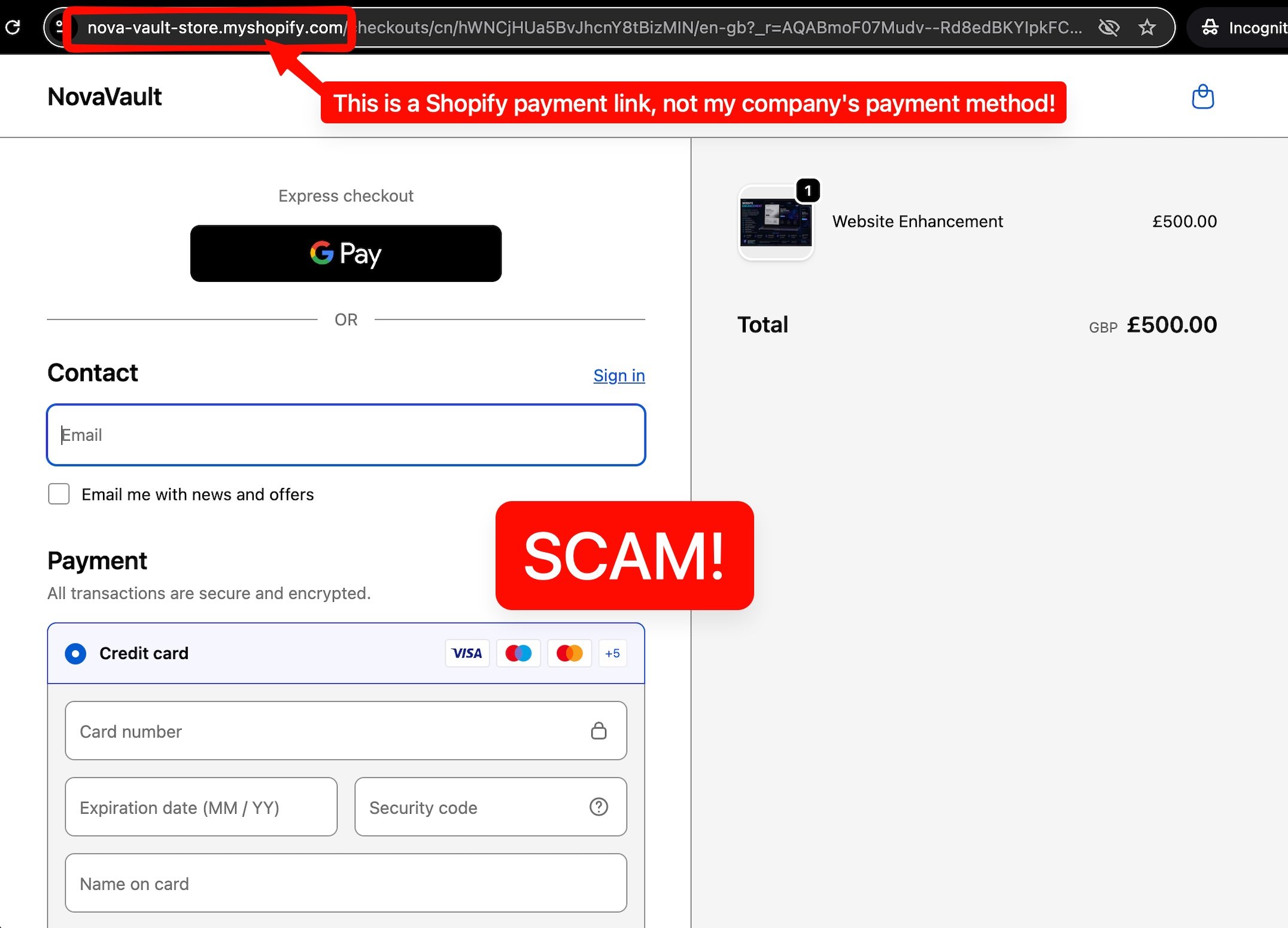
Example of a scammer’s payment page
If you end up in a position where your “designer” (aka the scammer) is asking for payment for services, are they asking you to pay in some way that they haven’t in the past? For example, are they asking you to pay by PayPal or some other payment platform that you haven’t used with them before? If they send a link to pay online, does it look like the page you have used to pay before? Look at the web address in the top of the browser - does this look odd? If they send an invoice, does it look like your past invoices?
Be very careful! Sometimes these payment links will take your money, which is bad enough, but other times the link to “PayPal” (or other payment platform) will actually take you to a clone website that has been designed to look exactly like the real PayPal website, but instead includes malicious code that can do all sorts of damage such as installing malware on your computer or capturing your credit card data. Never, ever click any links or buttons in an unverified email; always look at the sender domain name before you click on anything.
5. If in doubt, reply to an old email thread or send a separate email to check.
If you’re still not sure, you can always email or call your designer directly. The safest way to email would be to find an old email conversation with your designer and reply to that. Or, you can send a new email or forward the scam to the email address you have in your address book. However, be careful: if you replied to the scammer, their email address might have been automatically added to your contacts! If you are sending a fresh email to your designer, double check the “to” field to make sure it’s the actual email address you’ve communicated with before and not the scammer’s email address.
What to do if you have been targeted by the scam
Why marking and reporting the scam is important
You may be tempted to simply ignore the scam emails, but this won’t stop them coming, nor will it help to get the scammers shut down. While it can be annoying to have to take time out of your busy day to mark and report the emails, doing so can actually make a difference. Reporting phishing attempts helps to:
Cut down the number of scam emails that reach your inbox
Make yourself a more difficult target for scammers
Protect other people from online cyber crime
Marking and reporting should only take a minute, and all of us legitimate business owners really do appreciate your help.
Mark and report a scam email to your email software provider
If you received this scam as an email - not a form submission - then you can report it to your email provider. Do not report a Squarespace form submission email to your email software, or else you risk all future legitimate form submissions going into your spam folder. Follow the instructions below under Form Submissions instead.
All modern email software gives you the ability to do two things that can cut down on these types of scam emails. First, you should use the relevant instructions below to report the email as phishing to your email software provider. Then, you should mark the email as spam. Taking both of these steps will help the email software learn the patterns of the scam emails, and by marking the email as spam, it will stop future emails from the scammer using that particular email address from appearing in your inbox at all.
-
Open the email in Gmail.
Click the three vertical dots (More options) next to the "Reply" button.
Select Report phishing
Lastly, you’ll want to mark it as spam, too: check the box to the left of the email and in the top toolbar, click the Report spam icon ( ! ). Alternatively, if the email is open, click the Report spam button in the top menu.
-
Select the suspicious message.
In the top ribbon (Home tab), click Report or Report Message.
Choose Report phishing from the dropdown list.
A popup will appear, allowing you to confirm the report and send a copy to Microsoft.
Lastly, right-click the message and select Junk > Block Sender
-
Open the email.
Tap the three dots (...) menu in the top right corner.
Select Report Junk.
Select Phishing or Report Phishing.
Lastly, right-click the message and select Junk > Block Sender
-
Select the phishing message
Go to the top menu bar, and choose Message > Forward As Attachment
Send this to reportphishing@apple.com
Lastly, lick the Junk icon in the Mail toolbar to help improve filtering and move it out of your inbox.
Report a phishing email to Squarespace
Squarespace are actively investigating these scams and looking for ways to stop them, and they have recently enrolled help from their partner Netcraft. Please forward the entire scam email to reportphishing@squarespace-security.com and to scam@netcraft.com making sure you include the full email header and subject line. The easiest way to ensure you include all of the technical information that helps investigators, is to forward as attachment. View instructions on how to forward as an attachment for all main email software programs.
Report a phishing email to the cyber crime unit in your country.
If you have the time and really want to help cut down this type of scam, you can also report the phishing email to the relevant cyber crime unit in your country. Most of these governmental departments have the power to get the email accounts shut down, and can actually investigate to close down crime rings, as these types of scams are normally part of a large operation. I’ve listed the contact details for UK, USA, Canada and Australia below as this is where most of my clients come from, but you can look up the relevant email address for your country on a search engine by typing “report phishing email in xxxxx”.
Make sure you forward all of the email header information using the forward as attachment method above.
-
Forward phishing emails to: report@phishing.gov.uk
-
You can report spoofing/phishing emails to the following:
Forward it to the Anti-Phishing Working Group at reportphishing@apwg.org
-
-
Forward it to report@cyber.gov.au (the Australian Cyber Security Centre)
Form Submissions: use the built-in link to report to Squarespace
If you received the scam as a form submission email (the scammer completed a form on your website rather than emailing you directly), then you should use the link at the bottom of the form submission email to report the scam to Squarespace. It’s the last line of text on the form submission that says: Does this submission look like spam? Report it here.
As mentioned above, do not report the form submission email to your email software, or else you might accidentally send all future website enquiries into your spam folder by blocking the Squarespace form sending email address. Not what you want!
How to keep your Squarespace website and account secure
Never share your Squarespace password with anyone, even your web designer. Your login is tied to you personally. A legitimate web designer will never ask you to send them your Squarespace login details. They will have their own personal login.
Never grant access to your website as an administrator or contributor without verifying the person’s email address and/or that they are who they say they are.
Always use a strong password and do not reuse passwords across multiple different platforms. Even though there hasn’t been a Squarespace data breach, if you use the same password on Squarespace as some other platform, if that platform has a leak, you are vulnerable. Use a password manager app such as 1Password (Mac) or NordPass (Windows) or ProtonPass (free) to securely store your passwords and simplify logins.
Enable 2-Factor Authentication on your Squarespace account.
Always double-check the sender’s email address on every email that appears to be from Squarespace. Even if the logo and formatting look identical to an email that you have received from Squarespace in the past, you must check the email header to be 100% certain. Generally speaking, emails from Squarespace will come from @squarespace.com , @mail.squarespace.com or @squarespace.info - but there are some exceptions for specialist services such as Squarespace Campaigns or AcuityScheduling. You can check the list of valid Squarespace email senders here and you can find general tips on how to tell if an email from Squarespace is legitimate here.
Perform regular browser and website hygiene, such as forcing devices and apps to log out of your Squarespace account, keeping your browser version updated, and removing any old contributors. Find out more about these and other Squarespace general security tips here.
Final thoughts about scams
Several years ago, it was pretty easy to spot a scam: a money request from a Nigerian prince, an email riddled with spelling errors and poor grammar. These days, things are much more sophisticated. Don’t speak English well? An AI tool can write the email for you in whatever tone of voice you want, with perfect grammar and spelling. Not sure how to run a scam? AI can help you there, too - from helping with strategy and logistics, telling you what the easiest targets are, to automation tools that can scour and scrape the web in seconds. This is big business. I even got contacted personally through my own website by a company offering to sell me their AI service for sending bulk contact form submissions that had been trained to bypass CAPTCHA security (those annoying things that ask you to select all pictures of motorcycles and such).
Unfortunately, as these types of automated and AI tools get more and more powerful, the more they can be used by unscrupulous people to make life even harder for the rest of us who just want to run our businesses in peace. Authenticity is becoming more and more important in a world where anyone can make a fake video of anyone doing anything.
I can only hope that authentication tools and techniques will catch up with the rapid growth of automations and fakes. Until then, we unfortunately have to keep our own personal scam-spotting skills sharp and up to date. I hope this article has helped you do that.
This article was written 100% by a real human.